Wir sind bei den Foren-Tagen in Kassel dabei!
Samstag, 14. Oktober 2023
Anmeldung hier: https://forentage.de/?page_id=849
Besuchen Sie uns auf unserem Stand und Sie bekommen ganz besondere Konditionen.
Wenn Sie verbindlich vor Ort eine IBExpert Developer Studio Edition, IBExpert Developer Studio Edition Software Subscription oder ein IBExpert Day Edition Paket bestellen, erhalten Sie einen Preisnachlass von 50%.
Unsere Vorkasse-Rechnung versenden wir am Montag, 16.10.2023 per E-Mail als PDF Datei, Ihren Zahlungseingang erwarten wir bis spätestens Donnerstag, 19. Oktober 2023.
Besucher, die den Kauf über ihre Firma abwickeln müssen, erhalten auf Anfrage an unserem Stand ein Angebot mit 25% Preisnachlass.
Unser schriftliches Angebot versenden wir am Montag, 16.10.2023 per E-Mail als PDF Datei. Ihre Bestellung muss innerhalb von 10 Tagen erfolgen, Zahlung per Vorkasse-Rechnung.
Vom Angebot ausgenommen sind die Company Year Edition, Enterprise Server Year Edition, die IBExpert Distribution OEM Edition, IBExpert Server Tools sowie alle IBExpert Dienstleistungen und Hardware Produkte.
Risiken einer Business Software als Cloud Lösung
Firebird White Paper
Holger Klemt, Januar 2026
Was tun, wenn der Porsche nicht mehr anspringt oder Ihre Cloud ERP auch nicht mehr einsetzbar ist?

Sicher haben einige Leser schon die aktuellen Artikel über unzufriedene Porschekunden in Russland gelesen, deren Fahrzeuge nicht mehr starten, weil eine global implementierte Diebstahlsicherung im Fahrzeug wegen fehlendem Cloudzugriff das Fahrzeug vorsichtshalber dauerhaft blockiert und die Kraftstoffzufuhr so abschaltet, dass man das auch nicht mit simplen Tricks umgehen kann, auch wenn da wohl schon einige Anbieter Workarounds angeboten haben. Porsche hat aus guten Gründen jeglichen Support für Russland sanktioniert, man sollte also von der Seite keine Lösung erwarten.
Was hat diese Geschichte mit einer Cloud ERP Lösung zu tun?
Nun denn, das werden sicherlich diverse Kunden früher oder später auch zeitnah merken.
Die Idee zu diesem White Paper wurde ausgelöst durch die Entscheidung eines mittelständischen Unternehmens in Deutschland, welches an mehreren Standorten bisher auf einer selbstgeschriebenen Delphi/Firebird Anwendung gesetzt hat und diese im Laufe der letzten 30 Jahre immer mehr erweitert und dabei Prozesse anforderungsspezifisch umgesetzt hat. Da war nicht alles perfekt, aber gerade im Bereich der Logistik wurden immer wieder wechselnde Standards so realisiert, dass es genau den Anforderungen entsprach.
Firebird Server Health Check & Backup Monitoring
(German-language version below)
Professional baseline assessment and ongoing monitoring for Firebird 2.x-5.x – now also available for in-house or externally sourced hardware
Reliable Firebird server operation does not depend solely on the hardware used. It is also crucial to have properly configured backups, effective restore processes, a clear server configuration, and regular monitoring of key system parameters.
Until now, this service package was only available if the server hardware was purchased directly from us. It is now also available to customers who already own their hardware or purchase it from another supplier.
For a flat fee of EUR 1,750 / USD 1,990 you will receive a service package valid for 3 years.
Initial session: Assessment of the current situation
Once the order has been placed, we will hold an initial remote session together with you. During this kick-off session, we will assess your existing server and Firebird environment and review the current technical situation.
The focus is primarily on the following points:
- Review of the existing backup automation
- Monitoring of automatic restore processes
- Identification of existing errors or vulnerabilities
- Review of existing changes to firebird.conf
- Implementation of a benchmark to assess server performance
The aim is to ensure, right from the start, that the key foundations for reliable Firebird operation are in place.
Backup monitoring using an automated IBEBlock script 
A backup is only genuinely useful if it is created regularly and also checked for technical issues. That is why we implement an automated IBEBlock script to monitor the ongoing backups.
The results are recorded centrally in a log. This allows errors to be identified at an early stage, before they become a real problem in an emergency. Monitoring therefore serves not only as a means of control, but above all for the early detection of errors.

Benchmarking and evaluation of server speed
As part of the initial analysis, we also carry out a benchmark test. This provides you with a practical assessment of the server’s overall performance, enabling you to better judge whether your existing hardware is adequately configured for your Firebird installation.
Analysis of existing Firebird configurations
If your software vendor has already made adjustments to the firebird.conf file, we will assess these as well. In doing so, we will check whether the changes are justifiable and sensible, or whether they could pose potential risks to stability, performance or maintainability.
Quarterly basic checks via remote session

We carry out quarterly baseline checks throughout the three-year period. These are conducted via remote access.
We will send you an email before each check. You can then invite us to a session using the remote access software of your choice. This means you retain control over access at all times and can decide for yourself when and which tool to use to establish the connection.
Price and duration
EUR 1,750 / USD 1,990 for 3 years
This includes the initial kick-off session, the setup of backup monitoring, an assessment of the existing Firebird environment, a server benchmark, and quarterly remote health checks throughout the project duration.
Response times and optional emergency service
The IBExpert RemoteDBA Standard Service is designed as a preventive health check and monitoring service and does not include a 24/7 emergency service.
In the event of a malfunction, our standard service offers a response time on the next working day during our regular business hours from Monday–Thursday 8.00 am - 4.00 pm and Friday 8.00 am - 2.00 pm (Central European Time).
An extended 24/7/365 emergency service can be added as an option for an additional charge (100%). Alerts are sent via Signal Messenger. For this additional service, we guarantee a maximum response time of 4 hours.
The response time refers to the point at which we begin to respond to or investigate the issue, not a guarantee that the problem will be fully resolved within that timeframe.
You can place an order by email to register@ibexpert.net.

Firebird Server Health Check & Backup Monitoring
Professionelle Basisprüfung und laufende Kontrolle für Firebird 2.x-5.x – jetzt auch für eigene oder fremdbeschaffte Hardware
Ein stabiler Firebird-Serverbetrieb hängt nicht nur von der eingesetzten Hardware ab. Entscheidend sind auch korrekt eingerichtete Backups, funktionierende Restore-Prozesse, eine nachvollziehbare Serverkonfiguration und eine regelmäßige Kontrolle der wichtigsten Systemparameter.
Bisher wurde dieses Servicepaket nur angeboten, wenn die Server-Hardware direkt über uns bezogen wurde. Ab sofort steht es auch Kunden zur Verfügung, die ihre Hardware bereits besitzen oder diese bei einem anderen Anbieter kaufen.
Für einen Pauschalbetrag von 1.750 € / 1.990 USD erhalten Sie ein Servicepaket mit einer Laufzeit von 3 Jahren.
Startsession: Aufnahme der Ist-Situation
Nach Auftragserteilung führen wir gemeinsam mit Ihnen eine erste Remote-Sitzung durch. In dieser Startsession erfassen wir die vorhandene Server- und Firebird-Umgebung und prüfen die aktuelle technische Ausgangssituation.
Dabei liegt der Schwerpunkt insbesondere auf folgenden Punkten:
- Prüfung der bestehenden Backup-Automatisierung
- Kontrolle der automatischen Restore-Prozesse
- Erkennung bereits sichtbarer Fehler oder Schwachstellen
- Bewertung vorhandener Änderungen an der firebird.conf
- Durchführung eines Benchmarks zur Einschätzung der Serverleistung
Ziel ist es, schon zu Beginn sicherzustellen, dass die wichtigsten Grundlagen für einen zuverlässigen Firebird-Betrieb vorhanden sind.
Backup-Überwachung mit automatisiertem IBEBlock-Script
Ein funktionierendes Backup ist nur dann wirklich hilfreich, wenn es regelmäßig erstellt und auch technisch überprüft wird. Deshalb richten wir ein automatisiertes IBEBlock-Script ein, mit dem die laufenden Backups überwacht werden.
Die Ergebnisse werden zentral als Log erfasst. So lassen sich Fehler frühzeitig erkennen, bevor sie im Ernstfall zu einem echten Problem werden. Die Überwachung dient damit nicht nur der Kontrolle, sondern vor allem der präventiven Fehlererkennung.
Benchmark und Bewertung der Servergeschwindigkeit
Im Rahmen der Startanalyse führen wir außerdem einen Benchmark durch. Dadurch erhalten Sie eine praxisnahe Einschätzung der generellen Servergeschwindigkeit und können besser beurteilen, ob die vorhandene Hardware für Ihre Firebird-Installation angemessen dimensioniert ist.
Prüfung vorhandener Firebird-Konfigurationen
Falls Ihr Softwarehersteller bereits Anpassungen an der firebird.conf vorgenommen hat, bewerten wir diese ebenfalls. Dabei prüfen wir, ob die Änderungen nachvollziehbar und sinnvoll sind oder ob daraus mögliche Risiken für Stabilität, Performance oder Wartbarkeit entstehen können.
Vierteljährliche Basischecks per Remote-Sitzung
Während der gesamten Laufzeit von 3 Jahren führen wir vierteljährliche Basischecks durch. Diese erfolgen per Remote-Einwahl.
Vor jedem Check senden wir Ihnen eine E-Mail. Anschließend laden Sie uns mit einer Remote-Zugangssoftware Ihrer Wahl zu einer Sitzung ein. Sie behalten damit jederzeit die Kontrolle über den Zugriff und entscheiden selbst, wann und mit welchem Tool die Verbindung hergestellt wird.
Preis und Laufzeit
Der Pauschalpreis für das komplette Servicepaket beträgt:
1.750 € / 1.990 USD für 3 Jahre
Enthalten sind die initiale Startsession, die Einrichtung der Backup-Überwachung, die Bewertung der vorhandenen Firebird-Umgebung, ein Server-Benchmark sowie die vierteljährlichen Remote-Basischecks während der Laufzeit.
Reaktionszeiten und optionaler Emergency-Service
Der IBExpert RemoteDBA Standard Service ist als präventiver Health-Check- und Monitoring-Service ausgelegt und beinhaltet keinen 24/7-Emergency-Service.
Im Fehlerfall gilt für den Standardservice eine Reaktionszeit am nächsten Arbeitstag während unserer regulären Geschäftszeiten Montag-Donnerstag 8:00 - 16:00 und Freitag 8:00 - 14:00 (Mitteleuropäische Zeit).
Optional kann ein erweiterter 24/7/365 Emergency-Service gegen Aufpreis (100%) hinzugebucht werden. Die Alarmierung erfolgt dabei über den Signal Messenger. Für diesen Zusatzservice stellen wir eine maximale Reaktionszeit von 4 Stunden sicher.
Die Reaktionszeit beschreibt den Beginn der Kontaktaufnahme bzw. Analyse, nicht eine garantierte vollständige Fehlerbehebung innerhalb dieses Zeitraums.
Bestellen können Sie formlos per E-Mail an register@ibexpert.net.
Firebird 5.0 is released
The Firebird Project has announced the general availability of Firebird 5.0 — the latest major release of the Firebird relational database for Windows, Linux, MacOS and Android platforms.
This release introduces improvements in areas of performance, multithreaded processing (including backup, restore, sweep), SQL queries profiling, with better scalability and numerous enhancements in SQL language.
Please refer to the Release Notes for the full list of changes. The complete Language Reference is also available.
Binary kits for all supported platforms are immediately available for download.
Firebird IFSLR Server
(German-language version below)
Optimised and dedicated for Firebird databases
- 3.2 TB NVMe SSD drive for operating system, Firebird 2.5–5.0 databases and backups
- Optional storage expansion up to 30 TB SSD
- Dual network interfaces:
- 10 GB RJ45, compatible with 1 GB RJ45
- Optional 10 GB SFP+
- 64 GB RAM, optionally expandable up to 128 GB
- Recommended operating system: Ubuntu Linux LTS
- Ubuntu Linux LTS also allows running one Windows Server Standard or Datacenter 2019 or newer virtual machine (Windows license key not included)
Running Windows Server as the native operating system requires a different hardware configuration and is available at additional cost. - 3U / 19-inch rackmount case, 17-inch depth
Price from EUR 6,700* – latest prices available on request. Due to the current extremely volatile raw material prices, we are unable to guarantee fixed prices long term.
We offer further Firebird IFS servers according to your requirements on request: register@ibexpert.net.
Due to their high reliability, our current configuration is delivered with an SSD for the databases. This SSD deployment delivers optimal performance for the Firebird database with maximum stability.
For an almost 100% reliability, we recommend using a second, identical Firebird IFS server, so that the databases can be protected by supplementary hardware with hourly backup/restore, or by replication at extra cost.
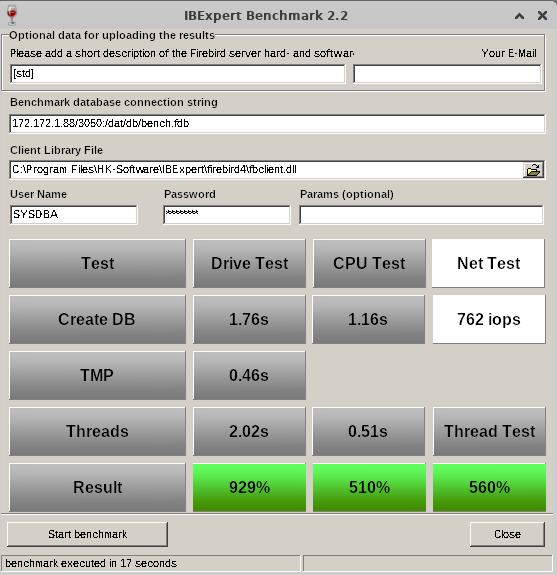
The IFSLR servers achieve IBExpert benchmark values between 320% and 965% with the current 64-bit Linux Firebird versions 2.5 and 3.0, and have proven to be extremely fast and reliable in our pre-installed configuration. The value displayed on the right was ascertained with Ubuntu Linux 22 and Firebird 5.
Important: The IFSLR servers are configured to be used exclusively as fast Firebird servers.
You have full access to all Firebird directories and database paths, but cannot install any other software on this server for performance and security reasons.
After the transfer has been carried out together with you by remote maintenance and the Firebird databases have been set up, we will also set up a backup/restore for you, so that your data backups are reliably performed daily. The data backups are additionally secured on any other drive in the network or in the cloud.
Compare the speed of our servers with your current hardware: https://ibexpert.net/cms/ibexpert-benchmark
Hardware maintenance and RemoteDBA
The RemoteDBA is a database administrator who remotely accesses the database systems to carry out their work.
This offers the advantages of geographical and temporal independence for database maintenance.
Almost all database-relevant activities on physical and virtual environments, such as monitoring, database operation and prompt troubleshooting, are covered by this service.
The contract is for a maintenance period of 4 years per IFS server and is valid from the date of order.
The basic setup of your IFS servers is included in the hardware maintenance and RemoteDBA package and guarantees optimal performance.
Changes and patches are applied by IBExpert in agreement with both parties.
With Windows servers, only the restoration of the operating system as delivered is included; customised settings are only restored at an additional expense and charged separately as part of our IBExpert and Firebird Standard Hotline (prepaid).
In the event of a server failure, IBExpert GmbH will take care of the recovery of the defect IFS server as part of the Hardware Maintenance and RemoteDBA package and, if possible, restore it remotely.
In the event of a hardware defect, the server is replaced with a functioning version.
The statutory warranty period for our devices is 24 months in accordance with § 438 BGB (German Civil Code) as a bring-in service.
If the defect is not covered by legal warranty, then the repair will be carried out for a fee, and the repaired server will be returned to you.
During this period, you are not entitled to an exchange or replacement server.
Maintenance contract and RemoteDBA for 4 years: EUR 1,799.00
Offer subject to change without notice.
Delivery dates on request, payment in advance.
The specified delivery dates are always non-binding.
*All prices excl. sales tax/VAT where applicable. Transport costs depend upon delivery location.
Firebird IFSLR Server
- 3,2 TB SSD NVMe für das Betriebssystem, Firebird 2.5-5.0 Datenbanken/Backups
- Optionale Speichererweiterung auf bis zu 30 TB SSD
- Duales Netzwerkanschluss:
- 10 GB RJ45, kompatibel mit 1 GB RJ45
- Optional 10 GB SFP+
- 64 GB RAM, optional erweiterbar auf bis zu 128 GB
- Empfohlenes Betriebssystem: Ubuntu Linux LTS
- Ubuntu Linux LTS ermöglicht zudem den Betrieb einer virtuellen Maschine mit Windows Server Standard oder Datacenter 2019 oder neuer (Windows-Lizenzschlüssel nicht im Lieferumfang enthalten)
Der Betrieb von Windows Server als natives Betriebssystem erfordert eine andere Hardwarekonfiguration und ist gegen Aufpreis erhältlich. - 3 HE Höhe / 19 Zoll Breite / 40 cm Länge Rackgehäuse
Preis ab 6.700 EUR* – tagesaktuelle Preise auf Anfrage. Aufgrund der aktuell extrem schwankenden Rohstoffpreise können wir keine langfristigen Festpreise garantieren.
Weitere Firebird IFS Server bieten wir entsprechend Ihrer Anforderungen auf Anfrage an: register@ibexpert.net.
Aufgrund der hohen Ausfallsicherheit wird unsere aktuelle Konfiguration mit einer SSD für die Datenbanken ausgeliefert. Der Einsatz dieser SSD liefert die optimale Leistung für die Firebird Datenbank bei maximaler Stabilität.
Für eine nahezu 100 prozentige Ausfallsicherheit empfehlen wir, einen zweiten, baugleichen Firebird IFS Server einzusetzen, so dass die Datenbanken durch eine zweite Hardware mit stündlicher Backup/Restore Sicherung, oder gegen Aufpreis, per Replikation abgesichert werden können.
Die IFSLR Server erreichen im IBExpert Benchmark mit der aktuellen 64-Bit Linux Firebird Version 2.5 und 3.0 zuverlässig Werte zwischen 320% und 965% und haben sich in der von uns vorinstallierten Konfiguration als ausgesprochen schnell und zuverlässig gezeigt. Der rechts abgebildete Wert wurde mit Ubuntu Linux 22 und Firebird 5 ermittelt.Wichtig: Die IFSLR Server sind so konfiguriert, dass diese ausschließlich als schnelle Firebird Server eingesetzt werden.
Sie haben vollen Zugriff auf alle Firebird-Verzeichnisse und Datenbankpfade, können auf diesem Server aber aus Performance- und Sicherheitsgründen keine andere Software installieren.
Nach der gemeinsam per Fernwartung durchgeführten Übertragung und der Einrichtung der Firebird Datenbanken richten wir für Sie auch ein Backup/Restore ein, mit dem Datensicherungen täglich zuverlässig durchgeführt werden.
Die Datensicherungen werden auf einem beliebigen anderen Laufwerk im Netzwerk oder in der Cloud zusätzlich abgesichert.
Vergleichen Sie die Leistung unserer Server mit Ihrer aktuellen Hardware: https://ibexpert.net/cms/ibexpert-benchmark
Hardwarewartung und RemoteDBA
Der RemoteDBA ist ein Datenbankadministrator, der seine Tätigkeit via Fernzugriff (Remote Access) auf den Datenbanksystemen durchführt.
Der Vorteil dieser Methode zum Betreuen der Datenbanken ist die räumliche und zeitliche Unabhängigkeit. Es lassen sich fast alle datenbankrelevanten Tätigkeiten auf physischen und virtuellen Umgebungen wie das Monitoring, der Datenbankbetrieb und die unmittelbare Störungsbehebung mit diesem Service abbilden.
Der Vertrag wird je IFS Server für einen Wartungszeitraum von 4 Jahren geschlossen und gilt ab Auftrag.
Die Grundeinrichtung Ihrer IFS Server ist im Hardwarewartung und RemoteDBA Paket enthalten und garantiert eine optimale Performance.
Änderungen und Patches werden in Absprache beider Parteien von IBExpert eingespielt.
Bei den Windows Servern ist nur die Wiederherstellung vom Betriebssystem in den Auslieferungszustand enthalten, angepasste Einstellungen werden als Zusatzaufwand wieder hergestellt und separat im Rahmen unsere IBExpert und Firebird Standard Hotline (Prepaid) berechnet.
Wenn es zu einem Ausfall des Servers kommen sollte, kümmert sich die IBExpert GmbH im Rahmen des Vertrages um die Wiederherstellung des fehlerhaften IFS Servers und stellt diesen per Remote-Zugriff wieder her.
Im Falle eines Hardwarefehlers wird der Server gegen eine funktionierende Version ausgetauscht.
Gesetzliche Gewährleistungsfrist nach §438 BGB, jedoch nur als Bring In Service.
Liegt kein gewährleistungsrelevanter Fehler vor, wird die Reparatur kostenpflichtig bearbeitet und Sie erhalten den reparierten IFS Server zurück.
Ein Anspruch auf ein Austausch-/bzw. Ersatzgerät besteht nicht.
Wartungsvertrag und RemoteDBA für 4 Jahre: 1799,00 Euro
Angebot freibleibend, ohne Gewähr.
Liefertermine auf Anfrage, Vorauskasse.
Genannte Liefertermine sind immer unverbindlich.
*Alle Preise zzgl. MwSt. und Verpackung/Versand (Versandkosten je nach Lieferort).
IBExpert Benchmark Tool
Free IBExpert Benchmark Tool
IBExpert Developer Studio Benchmark
How does it work?
How do your results compare?
The current version was released in January 2026, and includes some bugfixes, preventing the benchmark to crash on some servers.
We also have a new result, but it is just to measure the network speed between the client and server (we know that it does not show useful values when using the free benchmark as this version always using localhost as the server network address, but especially for the full version incorporated in the IBExpert IDE, it is very helpful to detect slow network configs to understand why Firebird-based applications run slower than expected. Outdated Router technology, network bridge components etc. are often responsible for poor software speed.
The Net Test executes 2000 inserts to a table with 100 columns and sends all params from client to the server in individual params, so this function will create a few hundred thousand very small TCP IP packages over the network and the total time is measured by how many operations were done within each second.
A good value on fast networks should have around >=400 IOPs. If it is much slower, you should ask your network support to check the speed of components used.
It is not part of the calculated percentage result values, and also the time it takes is not used there, since these result values use minimal network traffic to measure the server speed and not the network speed.
Benchmark results on an IFSLR Server using Ubuntu Linux 22 and Firebird 5
Compare your server's performance to our IFS servers!
How do you measure the performance of your own server or your clients'? Have you ever tried to compare the database speed of your Firebird server with new server hardware? Is a XEON Machine better than an Opteron? What improvements can you expect from fast SAS hard disks, RAID controllers or Enterprise SSDs?
This simple but effective tool gives you a reference benchmark, based on our recommended IFS Servers. Using IBExpert Benchmark you can generate and compare a reproducible speed index for your Firebird Server hardware. On average, our IFS servers with Firebird are 5 to 10 times faster than the server or virtual machines that our customers have previously used.
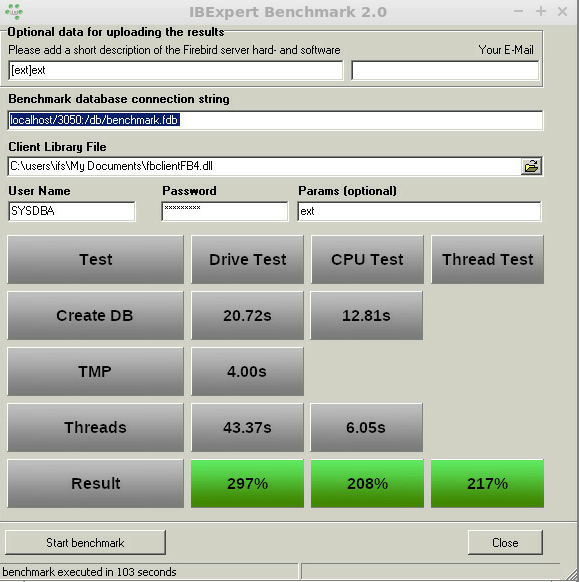
Benchmark (extended) results using Firebird 4.0 on an IFSML Server
To perform the IBExpert Benchmark at your customers and also take advantage of the extended and XXL benchmarks, you can use either the IBExpert Developer Studio customer version or the IBExpert Day Edition. To perform standard benchmarks locally, you may use our Free IBExpert Benchmark Tool.
Free IBExpert Benchmark Tool
You can use the IBExpert Benchmark Tool free of charge on any Windows computer. This limited special version allows standard benchmarks to be performed locally and includes Firebird 2.5, 3.0, 4.0 and 5.0 versions, executed in application mode, so you do not need to install Firebird on the server to be tested.
The Benchmark Tool is quick and easy to use: download it here: https://ibexpert.net/benchmark/setup_benchmark.exe, install it on the drive that you want to test.
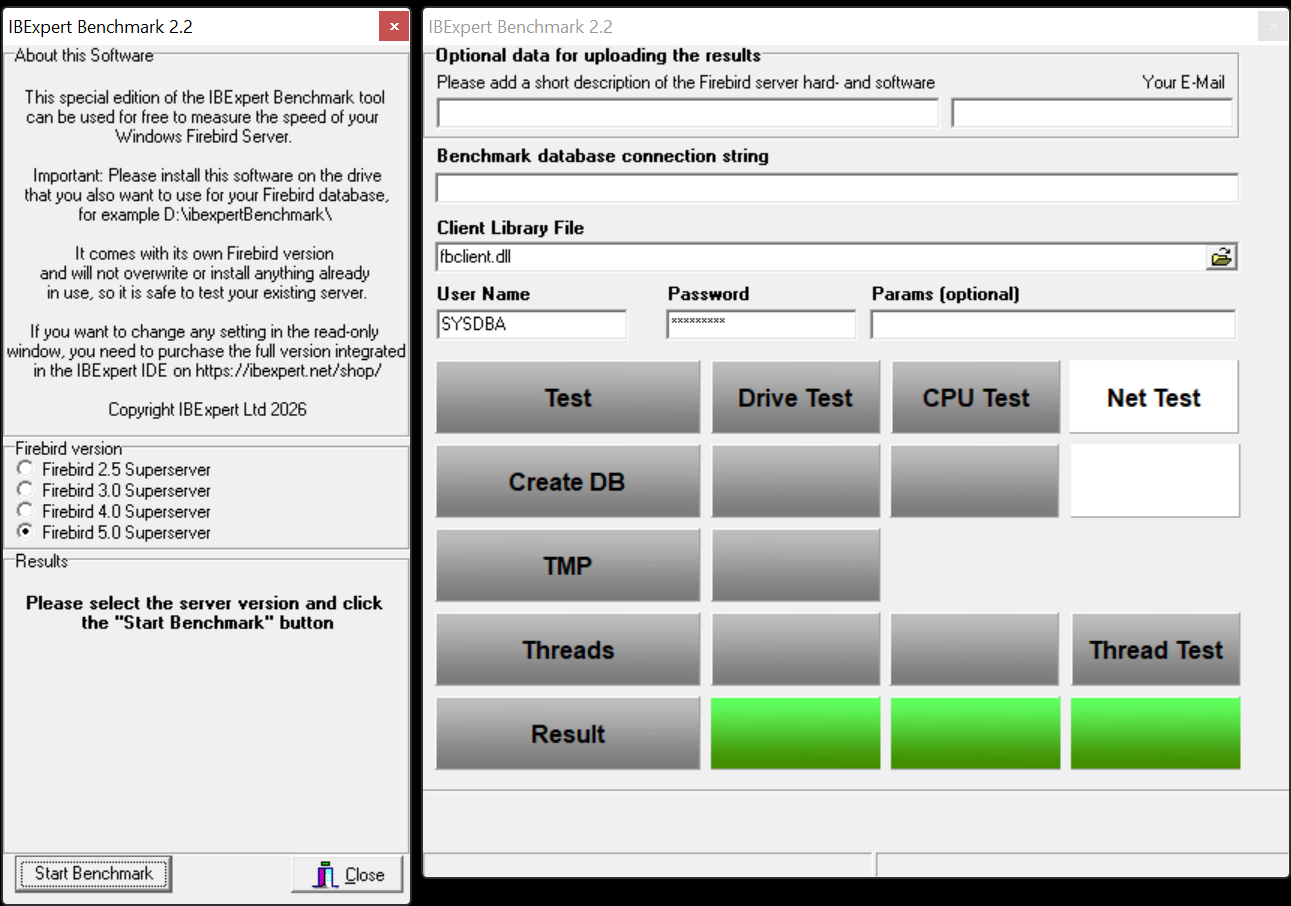
The Benchmark Tool tests 10 parallel running threads.
Running the benchmark will not overwrite any programs already in use, nor does it install anything, so you can safely run the benchmark on your server. The IBExpert Benchmark Tool does not use an existing Firebird installation and will only test the drive on which it is installed.
Select the Firebird version you wish to use for your benchmark in the left-hand panel: Firebird 2.5 Superserver, Firebird 3.0 Superserver or Firebird 4.0 Superserver. The selection in this free version has been limited so that even users with no Firebird knowledge or experience can easily perform this quick benchmark test.
The right-hand window in this free version is read-only. (In the paid version you can enter any and all of this information, e.g. define your own connection string and client library file).
Start the benchmark by clicking Start Benchmark in the bottom left-hand corner.
Important: you will need to install and run this as Admin.
Note: Should you receive an error message, please download and install the current version.
The benchmark process and results are explained below under How does it work?
If you would like a more flexible version of our Benchmark, which allows you to change various test options, test multiple drives, various Firebird instances or even perform a benchmark on a Linux operating system or remote servers, you should use the following Benchmark, included in all IBExpert customer version IDEs.
IBExpert Developer Studio Benchmark
This version offers standard, extended and XXL benchmarks, which can be performed on the Firebird 2.5 Superserver, Classic server, Superclassic server or Firebird 3.0 and Firebird 4.0 32- or 64-bit, Windows, Linux etc. either locally or remote. The Benchmark software is implemented as a 32-bit Windows software, but it can connect to any remote Firebird installation.
If you wish to collect the results for comparison with different hard and software combinations, enter a brief description of the configuration to be tested, along with the recipient email address for the statistic report.
Benchmark (extended) results using Firebird 4.0 on an IFSML Server
Then add the required database connection information - you need to set a new path for the newly generated database; if you specify the path of an existing database, you will receive a warning message:
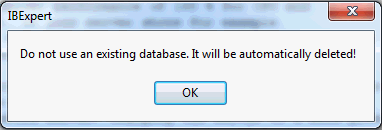
Specify the Firebird client, as well as the user name and password (the standard SYSDBA and masterkey). Finally click Start benchmark to run the benchmark test.
IBExpert now creates the demo database, which always follows the same guidelines. It then executes the INITALL procedure in this database. Following this parallel threads are created, which attempt to input further orders into the database. Following the Drive Test, the CPU Test test then is executed.
The results are displayed in the lower window: the drive and the CPU index are percentage index values comparing to our our IFS Server v. 6.0 series, which we rated at the time at 100%.
If you have specified an email address, you will receive the results by mail, with the heading as specified in the Please add a short description of the Firebird server hard- and software field.
How does it work?
Based on a demo database, which is created automatically, the standard benchmark, which is also included in the Free IBExpert Benchmark Tool, runs approximately 8 million operations (individual insert/update/delete/select statements) using 10 simultaneous processes in 2 runs on databases created with different parameters to demonstrate the impact of the physical drive speed.
The extended benchmark uses 50 parallel processes (simulating 50 concurrent users) and the XXL benchmark simulates 250 concurrent users with its 250 simultaneous processes.
Drive Test
The Drive Test is simply creating a benchmark database from a script. Within the Drive Test we changed the value of the so-called cache buffers (DefaultDBCachePages in firebird.conf) to 50, the smallest value possible. Then a stored procedure is executed inside the database to generate a lot of test data. In the Drive Test approximately 850,000 operations (i.e. INSERT, UPDATE, DELETE, SELECT statements) are carried out. This really measures the speed of the drive, because of the low-level of cache that is being used, is responsible for making a lot of I/O operations on the external drive.
- Create DB - shows the time in seconds that it takes to create the Demo database.
- TMP - Temporary file management that is used when for example, Firebird does not have any indices, which it can use, or it needs to perform some GROUP BY, HAVING or similar instructions.
- Thread test - this is the multi-threaded test. If you have for example a test on this machine, and you have 1 thread or 10 threads running, you will also see this running in the Task Manager. This can result in huge differences on different machines.
- Result - the basic value that is calculated here displays the combined results of the drive test, and we compare this value to a server that was distributed by ourselves around 2010 which had 100% speed. In reality, when you test on typical customer machines, especially in virtual environments, you will often see values of as little as 30%. Typical values are often in the range of 100%-150%.
CPU Test
This category calculates the percentage value for multi-threaded CPU tests with 5000 pages cache result to better see the advantages when using Firebird 3. This means that it no longer needs any operations on the disk. You will see a much faster result. The Thread Test, the multi-threaded line - with this one 10 parallel threads are always executed, which means it generates several thousand new orders inside the Demo database simultaneously. The Threads value here is the most important value, when you later have to check whether the server is really fast. Only this Threads value is recalculated to the Thread Test.
Thread Test
The Thread Test simply we take the CPU Test / Threads value and recalculate it. Thread Test simply means that we take the CPU Test / Threads value and compare it to the original machine. This machine is compared to our original machine as an index value.
How do your results compare?
Compare your server's performance to our IFS servers! This simple but effective tool gives you a reference benchmark, based on our recommended IFS Servers.
Our servers will show you a typical Firebird 2.5 Superserver performance of at least 200% for the CPU and at least 200% for the HDD Test with our IFS server series), und using Firebird 3.0 at least 230% for the CPU and at least 500% for the HDD Test. Results under 100% indicate an outdated server performance.
Important: This benchmark gives you a value to compare several hardware or software configurations running the Firebird server.
You will notice a huge performance increase, when comparing a Windows environment mit a Linux environment on the same hardware. This is partially due to the Windows NTFS file system, which is standard on Windows.
If, for example, you want to restart the Benchmark, especially on virtual machines, we always recommend executing this Benchmark several times, because sometimes when you execute it again, you can achieve better or worse values. This can happen because other jobs are being executed by the virtual machine host.
If the results are poor, click in the results window. You will be automatically redirected to our homepage. Here you can view our current offers for our really fast IFS Firebird servers.
Changing the server to a more powerful hardware might improve the speed by 100%. Additionally optimizing your software and database operations can often improve the speed by more than 1000%. Ask register@ibexpert.net for further support.